Lucidv1.1.0
Lucid on GitHub, stars:170
v1.1.0Lock screen, polkit, accounts and light mode

A whole desktop, themed from your wallpaper.

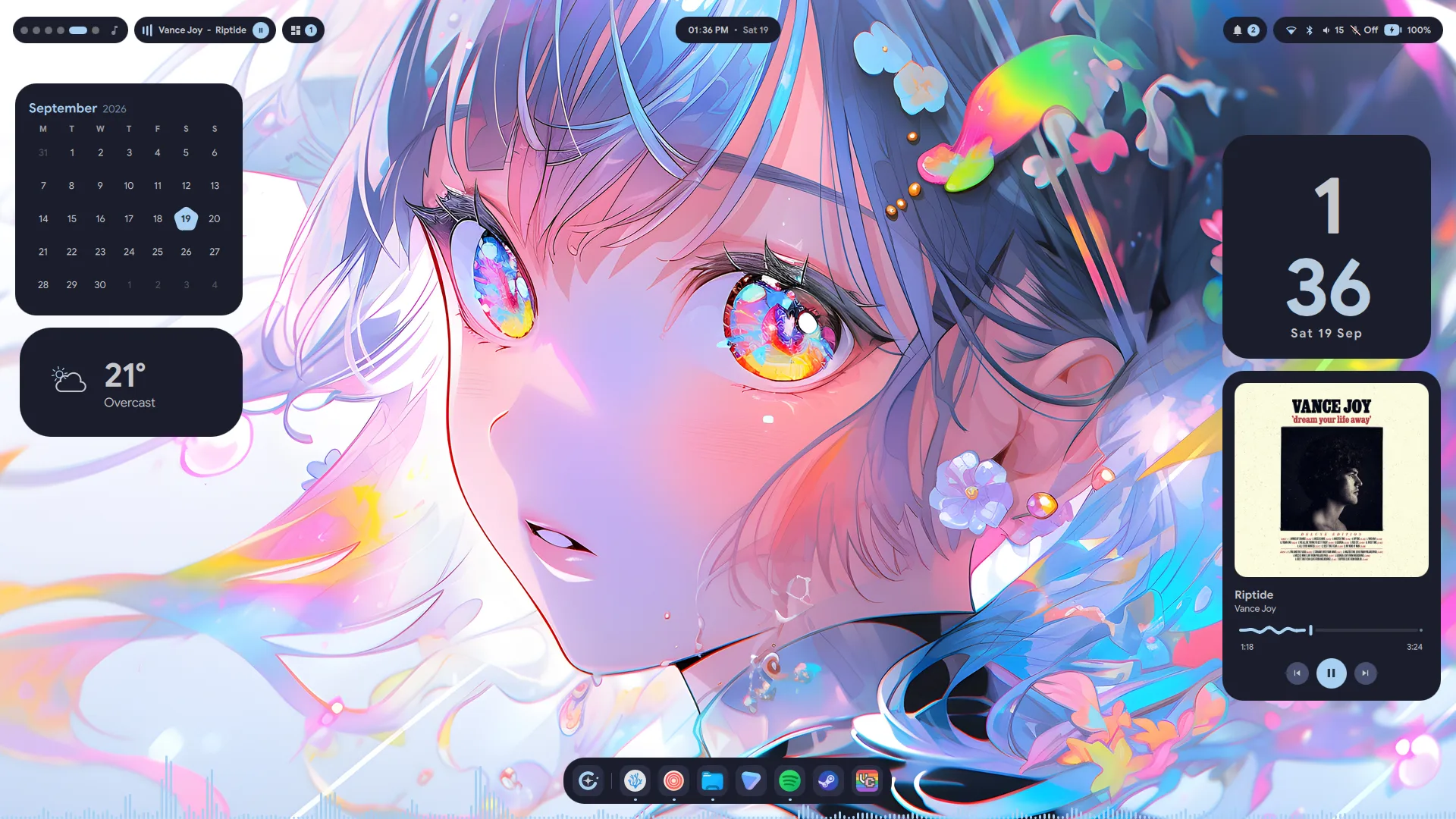
Lucid is a Material 3 Expressive shell for Hyprland, built on Quickshell. A bar, a dock that grows into a launcher, desktop widgets, a lock screen and a settings app, all wearing the colours of whatever is on your screen.

$ git clone https://github.com/Sn3akyy1/lucid.git && cd lucid && ./install.sh
170 stars 6 forks Arch Linux and Hyprland
Announcements

News from Lucid.

New releases, what is coming next, and anything else worth knowing. When a version lands, the shell tells you itself, in a notification just like this one.

What's in it

Everything a desktop needs, in one design language.

Every surface shares one palette, one set of motion curves and one settings app. The bar, the dock and the lock screen look like they came from the same place because they did.

6 modules

Bar

Workspaces, media, tray, clock, notifications and system, each a pill that opens into a panel. Float them as islands, or sit them in a notch flush with the screen edge.

System pill

Control centre

Wi-Fi and Bluetooth with full panels behind them, brightness, volume and audio device switching, then battery, RAM, CPU and every disk.

Scratchpads

Special workspaces

Music, chat and your to-do list slide over whatever you are doing and hide again with the same key. Each one starts its app if it isn't running.

  • Music Super+Shift+M
  • Comms Super+Shift+D
  • To-do Super+Shift+R
  • System monitor Ctrl+Shift+Esc
6 modes

Dock and launcher

A floating toolbar that grows into the launcher instead of opening a second window over it. One search field over apps, commands, themes, wallpapers, power and clipboard history. Type = for a calculator.

11 kinds, 33 looks

Desktop widgets

Clocks, calendars, weather, media, a live visualiser, notes, to-dos and your phone. Drag them anywhere, snap to the guides, and they come back where you left them.

17 pages

Settings

A GUI for all of it, down to your network, Bluetooth, displays, idle ladder, user accounts and phone. Every control shows a reset arrow once it moves off its default.

Session lock

Lock and login

A real session lock that checks your password through PAM and counts your tries against faillock, with a matching login screen for SDDM.

  • PAM
  • faillock countdown
  • Caps Lock badge
  • Polkit prompts
  • SDDM theme
Theming

Seven palettes, or your wallpaper's own.

Matugen and Pywal build a Material 3 palette from your wallpaper. Catppuccin Mocha, Gruvbox, Nightfox, Nord and Tokyo Night stay put. Every one of them has a light mode.

  • Change the wallpaper, change the desktop. The shell reads one file of Material 3 colour roles, and it is rebuilt whenever you pick a new picture.
  • Light mode is built, not inverted. Nord lands on its own Snow Storm, Gruvbox on its own cream, and light surfaces carry a trace of the accent.
  • Bring any scheme. Paste the URL of a colour-scheme repo into Settings → Theme and Lucid builds a full palette from it. Nothing from the repo is ever run.
  • It reaches past the shell. Kitty, the starship prompt, VSCodium and the login screen take the same colours, and GTK and Qt apps follow light or dark.

Theme

The same controls as Settings → Theme, running on the palettes the shell ships. Your pick sticks, on every page, until you change it.

Light or darkRe-derives the palette from your wallpaper in the mode you pick.
Colour schemeSwitching repaints this page in that palette.
Palette widgetThe card you can put on your desktop. Click a colour to copy its hex.
Matugen
Install

Three commands on Arch Linux.

The installer checks your system, asks before it installs anything, and backs up whatever it replaces.

$ git clone https://github.com/Sn3akyy1/lucid.git
$ cd lucid
$ ./install.sh

Then run hyprctl reload, or log out and back in. On first run, set a wallpaper from Settings → General. That is what generates your palette.

  1. Checks your systemRefuses to run anywhere it can't finish the job, rather than leaving you half-installed.
  2. Installs dependenciesUses paru or yay, falls back to pacman, and lists everything before it touches your system.
  3. Copies the shellTo ~/.config/quickshell, moving any existing config aside with a timestamp first.
  4. Sets up HyprlandKeybinds, window and layer rules, blur, animations and an autostart. It asks before replacing your config.
  5. Sets up themingThe palettes, the wallpaper hook and the matugen template, appended to your matugen config, never replacing it.
  6. Applies the lookKitty, starship, the VSCodium theme and the GTK theme. --no-look skips all of it.
  7. Pins the dockReads your installed apps, so the dock is never a row of blank tiles.
  8. Offers to restartA running shell moves onto the new files.
Keyboard first

Tap Super. Everything else is a chord away.

The installer ships a full set of binds. If you'd rather write your own, every surface can be driven with qs ipc call.

Launcher

Super tap

Command palette

Super+P

Workspace overview

Super+W

Settings

Super+S

Emoji picker

Super+.

Clipboard history

Super+Shift+V

Copy text off the screen

Super+Shift+T

On-screen keyboard

Super+K
Release · 17 September 2026

Lucid 1.1.0

Lock screen, polkit, accounts and light mode

Everything the shell asks you for, it now asks for itself: your password at the lock screen, an administrator's for the rest of the machine, and the accounts that sign in to it. All of it in Lucid's own design, with a login screen wearing the same palette.

The Lucid lock screen: a large clock on the left, and the sign-in card, the song playing and notifications on the right

A lock screen of its own

Rebuilt from scratch and laid out the way Material You lays out a lock screen: an oversized clock in the wallpaper's own colour, the weather, what is playing and your notifications at a glance. Your password goes through PAM, so any account can unlock, and a wrong one counts down against faillock's real limit.

Lucid's authentication dialog asking to run a program as another user, with two accounts to choose from

Every password prompt, in one dialog

Lucid is now the session's polkit agent. Mounting a disk, changing the time zone or running pkexec asks through the shell's own dialog, which says what is being asked and whose password it wants. polkit and PAM still decide; only the dialog is Lucid's.

The Lucid control centre: quick setting tiles, brightness and volume, now playing, and CPU, memory, battery and disk

A control centre that goes deeper

Notifications moved to their own pill, and the System pill kept device state: switch audio outputs and inputs from the volume rows, hold off sleep with a Caffeine tile, and read CPU temperature, memory in gigabytes and uptime.

Also in 1.1.0

  • Users and accounts. Add, remove and edit every account on the machine from Settings, pictures and groups included.
  • A new notification centre. Grouped by app, with inline reply, progress bars, and popups that stack under the bar.
  • Clipboard history in the launcher, images too. Super+Shift+V
  • An on-screen keyboard that never takes the focus off what you are typing into. Super+K
  • Light mode, built from each palette's own colours rather than inverted.
  • A login screen for SDDM, so the machine looks like itself before you have signed in.
  • Smooth on NVIDIA. Animations run at your screen's refresh rate.

The first community contributions landed too: a KDE Connect widget by @k-k-j123, a Sound page by @MrZtone and installer fixes by @arbelonson-source. Thank you.

Updating

Pull and run the installer again. Your settings, pinned apps and keys come with you.

$ git pull && ./install.sh